Acer TravelMate C210 Series Service Guide
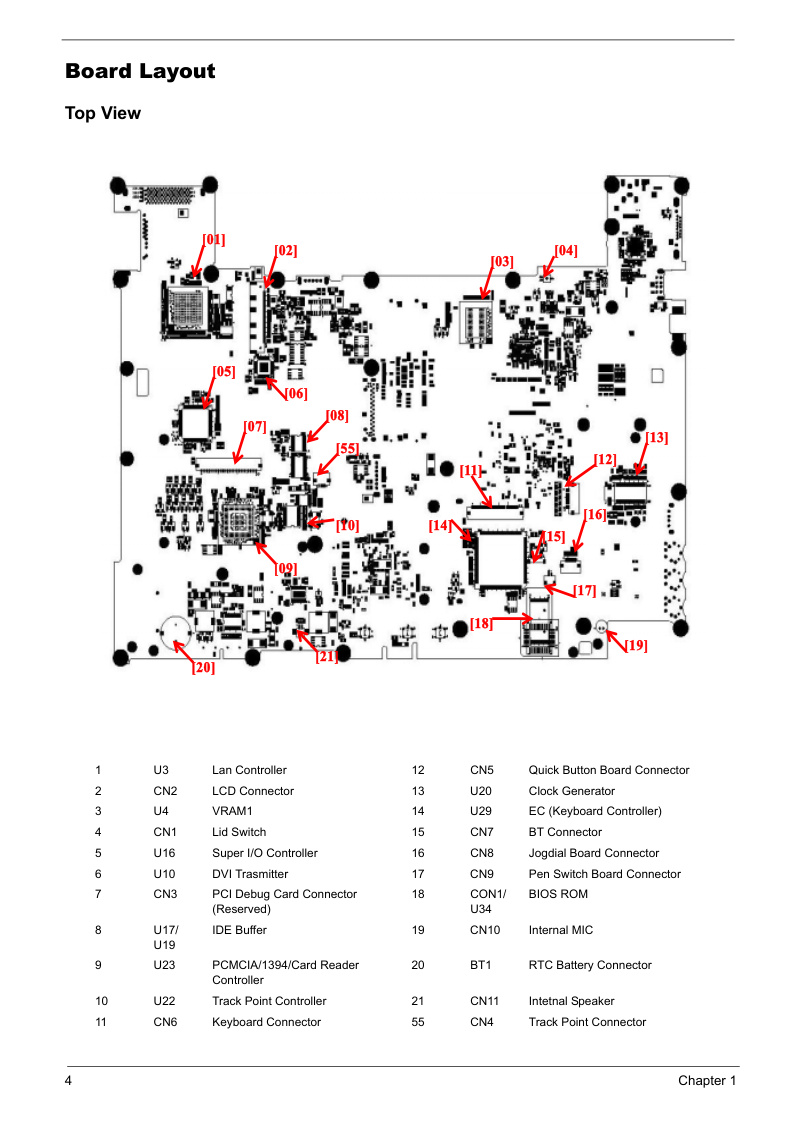
Complete service manual for the Acer TravelMate C210 Series tablet notebook. Details system specifications including Intel Centrino Duo processors, 12.1 inch XGA LCD display with integrated pen input, NVIDIA GeForce Go 7300 graphics, up to 2GB DDR2 memory, and 60-160GB hard drive options. Provides system block diagrams and motherboard layouts to understand internal architecture. Step-by-step disassembly and component replacement procedures cover the hard drive, optical drive, memory modules, wireless LAN card, LCD panel assembly, and keyboard. Includes BIOS setup utility reference, comprehensive troubleshooting procedures, POST error code interpretation, jumper and connector identification, and a complete field replaceable unit (FRU) parts list for ordering genuine components. An essential workshop reference for technicians servicing or repairing this ultraportable model.
Documentation must be downloaded on a computer (PC, Mac, or Linux).
Do not use a smartphone or tablet to download documentation; they generally lack sufficient memory capacity to handle large files, and few users know how to locate the download folder on these devices.
Once downloaded, you can use it right away and even print the pages you need, or use your smartphone in photo mode to translate into the language of your choice: Google Translate
Document Details
- Format
- Pages
- 131
- Size
- 3.1 MB
- Category
- Computers & IT