CANON - Canon EF 70 210mm f35 45 USM Parts
 by CANON
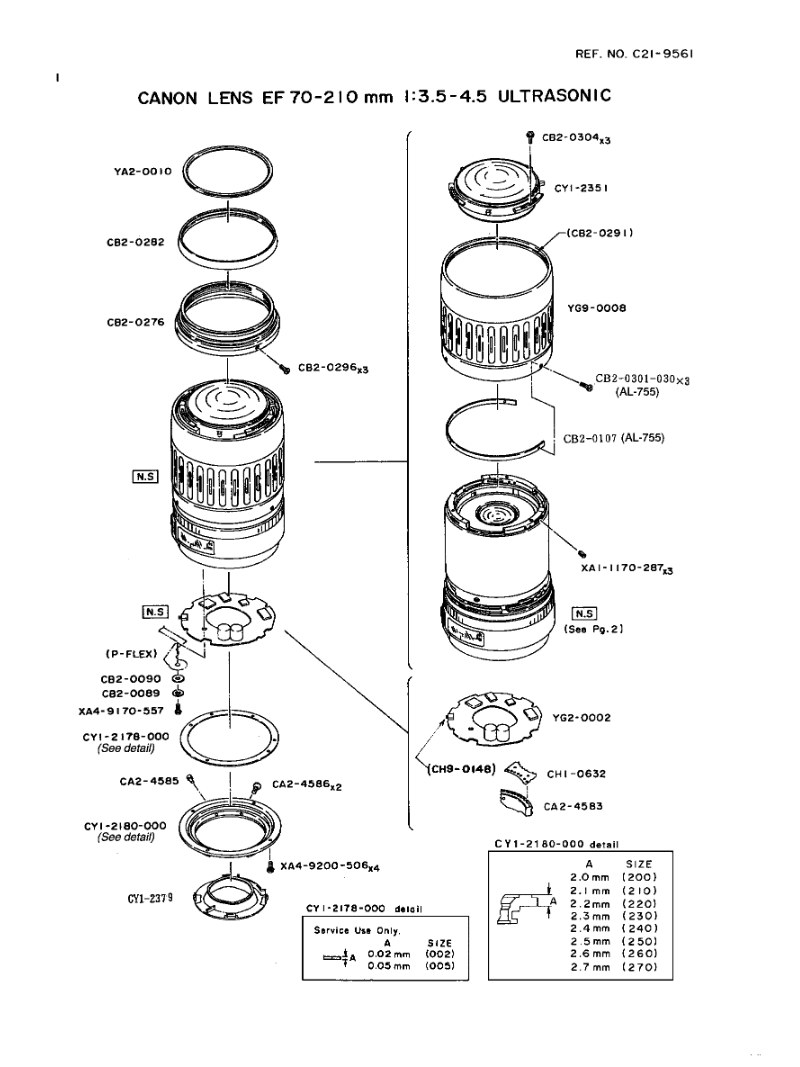
Complete parts catalog for the Canon EF 70-210mm 1:3.5-4.5 USM zoom lens (REF.NO.C21-9561). This official service manual provides detailed component identification and specifications across the full optical and mechanical assembly of this professional-grade autofocus lens. The parts list features exploded views and detailed diagrams showing optical groups with individual lens elements (CY1-2351 through CY1-2355), mechanical components including barrels, rings, collars, dust shields and zoom mechanisms, autofocus and electronic assemblies with motor units from the CG2, YG2, and YH1 series, flexible PCBs and electrical connectors for all electronic functions, and mount assemblies available in eight different camera mount variants (CY1-2180-000 series). Additionally included are fastening hardware and mechanical linking elements with precise dimension specifications, along with zoom and focus drive systems showing all integrated components. Each part carries a unique Canon reference number with critical dimensional tolerances clearly documented in detail tables. Color-coded variations and size specifications are provided where components are available in multiple configurations. Essential technical reference for lens repair technicians, optical maintenance specialists, and service centers requiring accurate component identification and replacement guidance.
Table of Contents:
- Cover, back
- Index ring assembly
- A/M switch assembly
- Screw, cross-recess, PH
- Screw, cross-recess, PH
- Screw, cross-recess, PH
- Screw, cross-recess, PH
- Screw, cross-recess, PH
- Screw, cross-recess, PH
- Screw, cross-recess, PH
- Screw, cross-recess, PH
- Screw, cross-recess, PH
- Screw, cross-recess, PH
- Screw, cross-recess, PH
- Screw, cross-recess, PH
- Barrel, zooming cam
- Ring, focusing cam
- Collar assembly
- Focusing unit
- Main CBA PCB
- Zooming ring assembly
- Flex, zooming PCB
- Scale, focusing
Documentation must be downloaded on a computer (PC, Mac, or Linux).
Do not use a smartphone or tablet to download documentation; they generally lack sufficient memory capacity to handle large files, and few users know how to locate the download folder on these devices.
Once downloaded, you can use it right away and even print the pages you need, or use your smartphone in photo mode to translate into the language of your choice: Google Translate
Document Details
- Format
- Pages
- 8
- Size
- 118.1 KB
- Category
- Photography