Dell Vostro 3360 Setup and Features Information
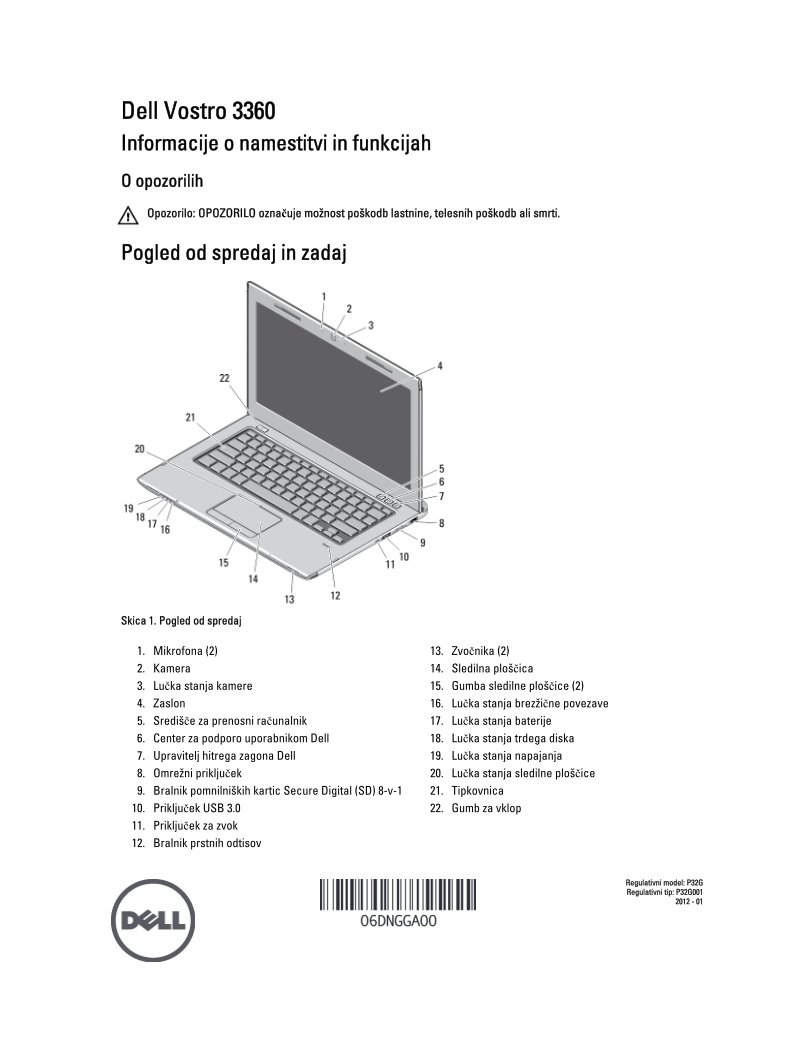
Dell Vostro 3360 Setup and Features Information guide — 4 pages in Slovenian covering essential setup and quick-start instructions for the Dell Vostro 3360 laptop. The manual includes detailed front and rear panel diagrams with clearly labeled components: built-in microphones, camera, USB 3.0 ports, HDMI and VGA video outputs, network connector, SD card reader, fingerprint reader, and power/status indicator lights. The rapid setup walkthrough covers AC adapter connection, network cable installation, USB peripheral pairing, and power-on procedures. Full technical specifications are provided: 65W AC power adapter with 100-240V input support, CR2032 onboard battery, compact chassis dimensions of 332 × 232.5 × 19.2 mm, weight of 1.68 kg, operating temperature range of 0–35°C, and regulatory model designations P32G and P32G001. A practical reference for initial deployment and feature identification on this ultraportable business notebook.
Documentation must be downloaded on a computer (PC, Mac, or Linux).
Do not use a smartphone or tablet to download documentation; they generally lack sufficient memory capacity to handle large files, and few users know how to locate the download folder on these devices.
Once downloaded, you can use it right away and even print the pages you need, or use your smartphone in photo mode to translate into the language of your choice: Google Translate
Document Details
- Format
- Pages
- 4
- Size
- 619.5 KB
- Category
- Computers & IT