Dell Vostro 3460/3560 Setup and Features Guide
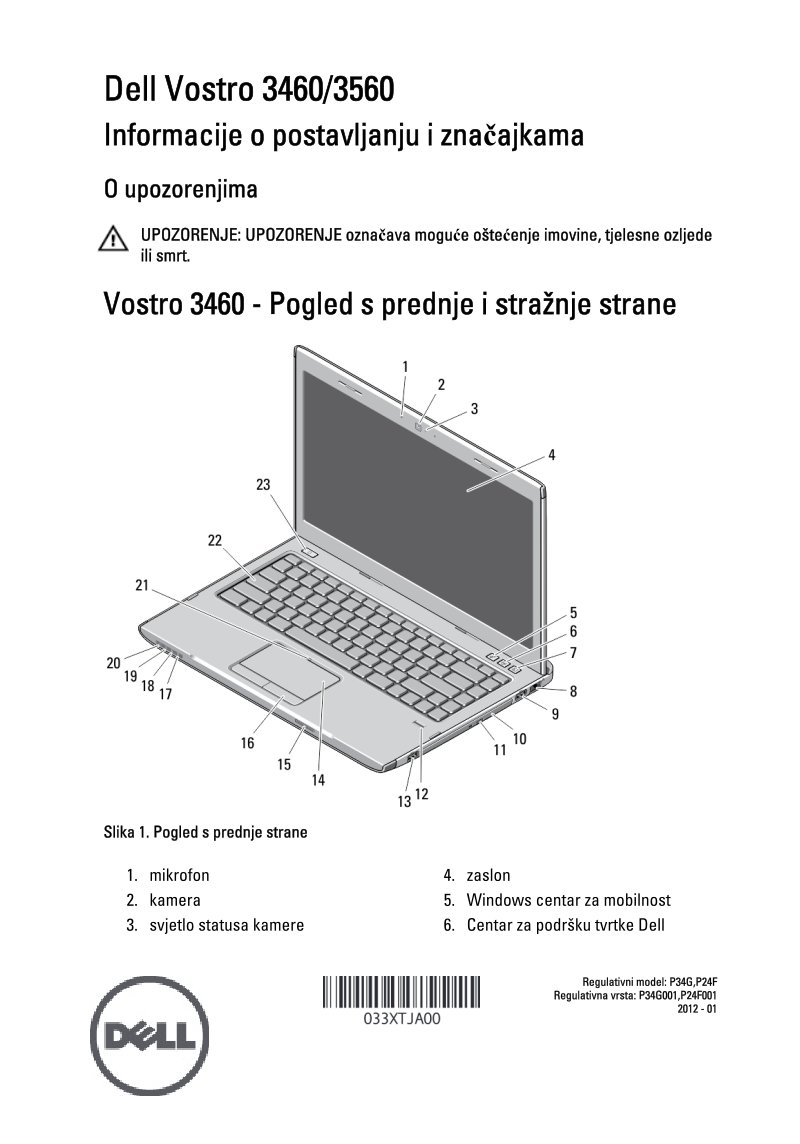
Dell Vostro 3460/3560 Setup and Features Guide — 8 pages in Croatian. This practical setup guide covers both the Vostro 3460 and 3560 laptop models with labeled front and rear component diagrams to identify ports, connectors, and key hardware features at a glance. Quick start instructions walk through essential setup tasks: connecting the AC adapter, establishing network connections via Ethernet cable, and attaching USB peripherals. The guide includes physical dimensions and weight specifications, environmental operating ranges for temperature and humidity, safety warnings for proper equipment handling, and Mexico-specific regulatory compliance information. A straightforward reference for getting your Dell Vostro laptop operational and understanding its core connectivity options and hardware layout.
Documentation must be downloaded on a computer (PC, Mac, or Linux).
Do not use a smartphone or tablet to download documentation; they generally lack sufficient memory capacity to handle large files, and few users know how to locate the download folder on these devices.
Once downloaded, you can use it right away and even print the pages you need, or use your smartphone in photo mode to translate into the language of your choice: Google Translate
Document Details
- Format
- Pages
- 8
- Size
- 900.4 KB
- Category
- Computers & IT