SPT - Olympus OM2
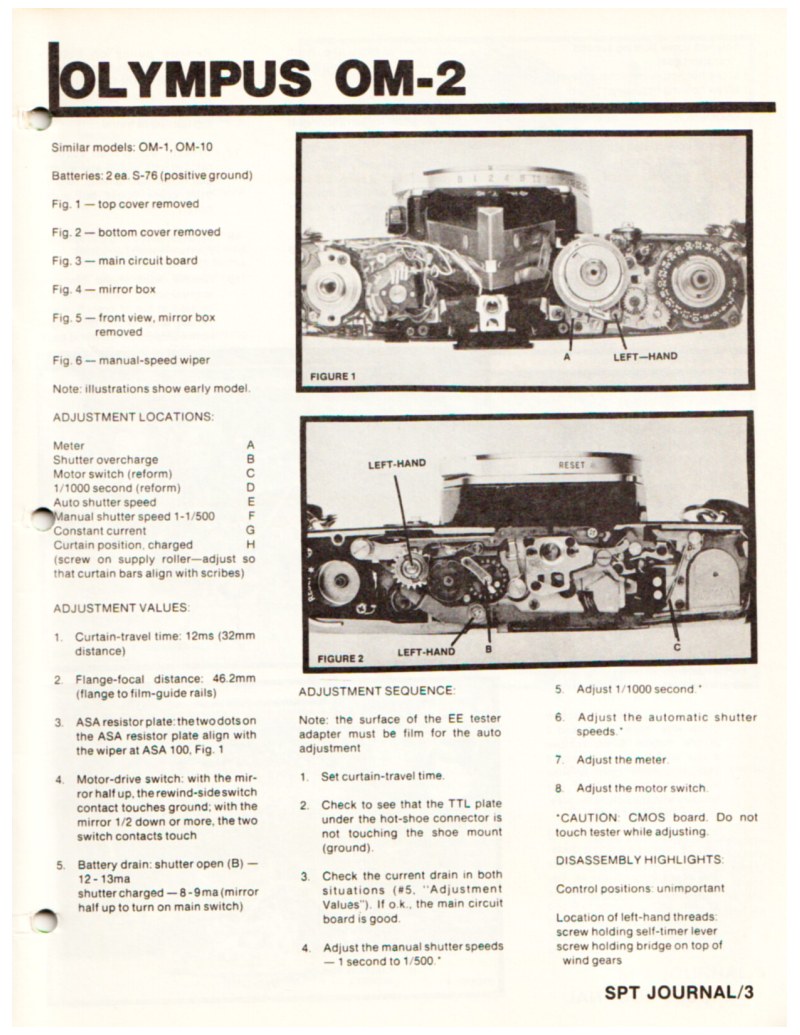
Complete technical documentation for the maintenance, adjustment, and repair of the Olympus OM-2 camera and related models (OM-1, OM-10). This service manual provides comprehensive procedures for technicians and analog photography enthusiasts seeking professional-level repair and troubleshooting information. The workshop guide begins with detailed adjustment location diagrams identifying all service points, including meter calibration, shutter overcharge, motor switch, 1/100 second speed reference, automatic and manual shutter speed settings, constant current circuits, and curtain position markers. Each adjustment location is precisely labeled with corresponding values and specifications for accurate reference during maintenance work. The adjustment sequence section provides methodical step-by-step guidance through critical calibrations: curtain-travel time measurement across the 32mm distance, flange-focal distance verification at 46.2mm, ASA resistor plate alignment, motor-drive switch configuration, and manual shutter speed calibration procedures. A comprehensive disassembly sequence details every stage from top cover removal through mirror box separation, with precise instructions for accessing internal components safely and systematically. The troubleshooting guide addresses frequent operational issues including mirror elevation problems, battery drain, double wind strokes, and shutter release mechanism failures, each section offering systematic diagnostic approaches to identify root causes. Specialized procedures cover electromagnet testing, main switch inspection performed without full disassembly, and transport ratchet validation to confirm mechanical integrity. Reassembly highlights ensure proper component orientation and functional verification of all systems. High-definition photographs accompany all critical procedures, providing clear component identification and precise manipulation guidance essential for both field and bench service work.
Documentation must be downloaded on a computer (PC, Mac, or Linux).
Do not use a smartphone or tablet to download documentation; they generally lack sufficient memory capacity to handle large files, and few users know how to locate the download folder on these devices.
Once downloaded, you can use it right away and even print the pages you need, or use your smartphone in photo mode to translate into the language of your choice: Google Translate
Document Details
- Format
- Pages
- 4
- Size
- 1.6 MB
- Category
- Photography