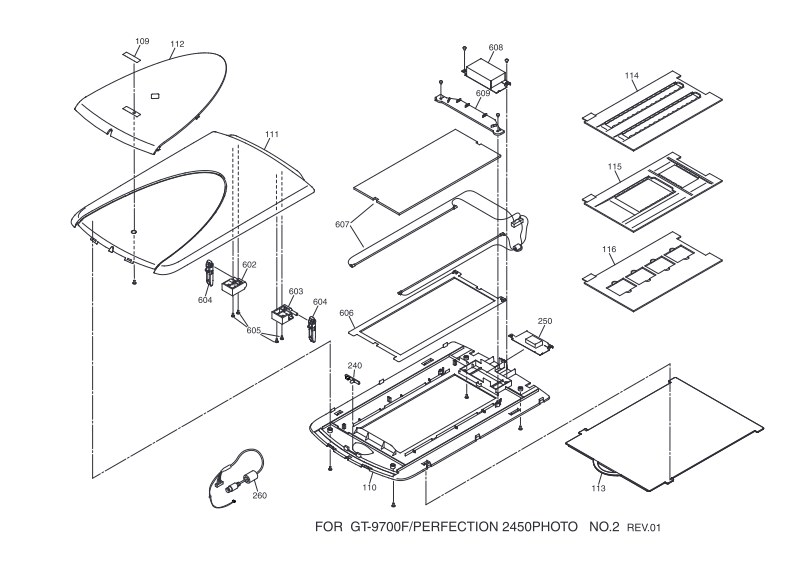
EPSON - Epson Perfection2450Photo Diagram
This parts identification guide for the Epson Perfection 2450 Photo scanner provides three detailed photographic diagrams essential for service and maintenance work. The first diagram shows the scanner with lid open, clearly labeling all major internal and external components—document feeder assembly, paper guides, drive rollers, and mechanical assemblies—so you can see how everything fits together. The second diagram focuses on the scanning glass platen and optical elements, identifying the glass assembly parts and guidance mechanisms you'll encounter during disassembly or component replacement. The third diagram illustrates proper loading and insertion of film strips, slides, and documents, making it straightforward to understand the accessory pathways through the scanner. Every part carries a specific reference code for quick, accurate identification when ordering replacements or performing maintenance. Whether you're a service technician diagnosing a mechanical issue, a maintenance professional planning a routine overhaul, or an experienced user tackling a repair, this parts diagram delivers the visual precision you need to work confidently on the Perfection 2450 Photo scanner.
Documentation must be downloaded on a computer (PC, Mac, or Linux).
Do not use a smartphone or tablet to download documentation; they generally lack sufficient memory capacity to handle large files, and few users know how to locate the download folder on these devices.
Once downloaded, you can use it right away and even print the pages you need, or use your smartphone in photo mode to translate into the language of your choice: Google Translate
Document Details
- Format
- Pages
- 3
- Size
- 898.5 KB
- Category
- Photography